Quick start
Start here. This page is one path in stages: a 60-second install check, connecting a coding agent, then the multi-seat golden path — the canonical "zero to two coordinated agents" walkthrough. If you read one section, read that one.
First 60 seconds
Verify a clean install before connecting real agents:
python -m pip install synapse-channel
synapse doctor
synapse demo --output ./synapse-golden-demo
synapse doctor checks identity, hub exposure, local disk pressure,
reachability, and wake-listener setup. It may warn that no hub or waiter is
running on a fresh machine. It also warns when the checked filesystem is nearly
full; pass --disk-path <path> to inspect the mount that will hold your Synapse
state, caches, or build artefacts. The installed demo is self-contained: it
starts a temporary local hub and real Git repository, connects Claude and
Codex, gives them separate file claims, deliberately causes an overlapping
claim, proves the mutation guard refuses Codex, atomically hands authority over,
and runs observed verification before releasing with a supported receipt. It
succeeds when it prints:
CLAUDE and CODEX are scripted in-process SynapseAgent identities in this
demo. It launches no provider CLI and spends no model turn.
success: coordination demo completed
It also prints the paths to golden-demo.json and
golden-demo-dashboard.html. Keep those artifacts in a chosen directory with:
synapse demo --output ./synapse-golden-demo
Open the HTML file to see the seven steps, conflict refusal, handoff, and receipt in the same dashboard projection operators use.
The first-use contract is machine-readable and starts no persistent service:
synapse commands --profile first-use --json
It reports three concepts and three shell commands against an eight-concept limit, with no optional dependency extra. This is a measurement of the public journey, not a switch that hides advanced commands.
After the self-contained proof, synapse quickstart-coding remains an optional
generated-workspace demo. It creates a temporary workspace, runs the coding-agent
live overlapping-claim refusal demo, removes that workspace after success, and
succeeds when it prints:
success: coding fleet demo completed
To inspect the same coding-agent workflow as files you can edit, scaffold a persistent workspace:
synapse new coding-fleet ./demo-fleet
cd ./demo-fleet
python run_demo.py
That generated workspace succeeds when it prints:
success: coding fleet demo completed
Connect an MCP-capable coding agent
The MCP extra gives an existing host the coordination tools without installing shell hooks:
python -m pip install 'synapse-channel[mcp]'
claude mcp add synapse -- synapse mcp
# Codex: codex mcp add synapse -- synapse mcp --name my-repo/codex
The short Claude command resolves the git project to <project>/mcp. Pin
--name <project>/<client> when several clients share a hub. Cursor and Claude
Desktop can reuse the
examples/mcp/.mcp.json
template.
After the host connects, call synapse_status and synapse_inbox at the start
of a turn. MCP tool discovery does not wake an idle provider; keep an exact
permanent waiter active with synapse arm install --identity NAME --start.
For unattended terminal prompt delivery, also install the active bridge with
synapse waker install --identity NAME --session SESSION --cwd "$PWD"
--agent-command PROVIDER --start
; systemd owns bridge recovery while the
provider terminal remains untouched.
See MCP server face for authentication and client-specific paths.
Fastest safe trial path
Use one self-contained path before changing a real checkout:
python -m pip install synapse-channel
synapse doctor
synapse demo --output ./synapse-golden-demo
The demo starts and stops its own local hub, uses a disposable committed Git
repository, proves separate claims and overlapping-claim refusal, denies a
mutation before handoff, permits it after handoff, and writes an observed
verification receipt plus a static dashboard. It needs no persistent hub,
provider CLI, Git hook, MCP host, or A2A bridge. The same exact three-command
block is regression-bound across the README, this quick start, and the CLI
reference, and its synapse demo command is exercised as a real subprocess.
After that proof passes, use synapse fleet-init --fix to prepare a persistent
local workspace, hub, and waiter, then run synapse git-init --name
trial-agent inside the real repository before an agent edits it. Optional A2A
interoperability is a follow-on in the A2A bridge guide; it is not a
prerequisite for first coordination value.
Strict exposed-hub profile
The trial commands above are loopback-oriented. Before exposing a hub, supply every control required by the strict profile; a partial command fails closed:
synapse hub --paranoid \
  --db ~/synapse/hub.db \
  --token-file ~/.config/synapse/token \
  --message-auth-key-file ~/.config/synapse/message-auth.keys \
  --require-message-auth \
  --acl-policy ~/.config/synapse/acl.json \
  --require-acl \
  --tls-certfile ~/.config/synapse/tls/server.crt \
  --tls-keyfile ~/.config/synapse/tls/server.key
Keep token and HMAC entries in owner-only files and replace the ACL and TLS paths with deployment-specific files. Read Paranoid mode for the enforced controls, missing hooks, and exposure boundaries.
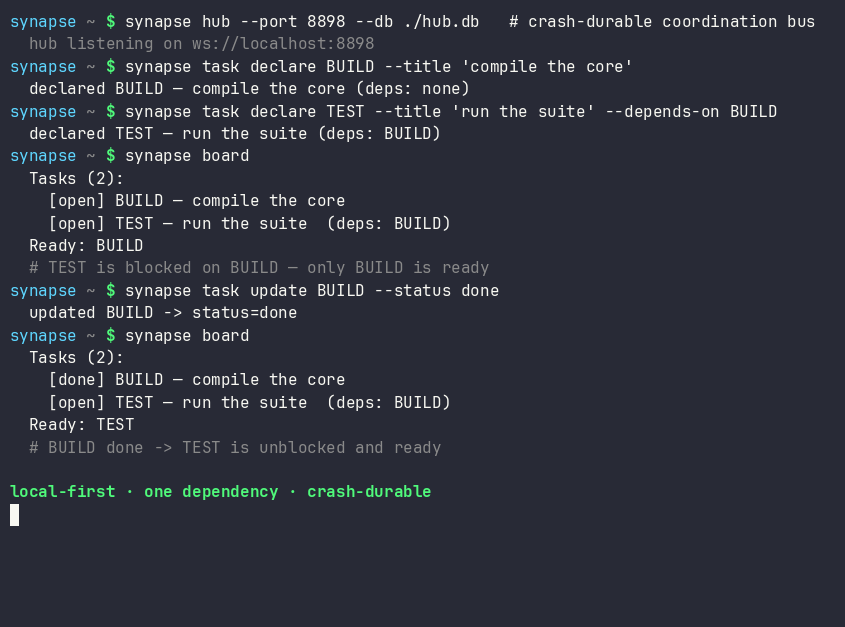
A complete session — declare a plan with a dependency, complete a task, and watch the dependent task unblock:
Launch a team
Bring up a hub plus one or two local model workers in one command:
synapse team
If Ollama isn't running, synapse team starts a single offline rule-based
worker (deterministic canned replies) so you can still try the flow end to end;
start Ollama and re-run for real model replies.
Multi-seat golden path (≈5 minutes)
Run the automated proof first. It uses the same production hub, Git claims, provider-neutral mutation guard, handoff, release verifier, and dashboard renderer as a real fleet:
python -m pip install synapse-channel
synapse doctor
synapse demo --output ./synapse-golden-demo
# open ./synapse-golden-demo/golden-demo-dashboard.html
The machine-readable artifact must report completed: true, deny the guard
before handoff, allow it after handoff, and carry a supported receipt whose
observed commands exited zero. The dashboard must show SEPARATE CLAIMS,
CONFLICT REFUSED, MUTATION DENIED, HANDOFF, and VERIFIED RECEIPT.
Then apply the same controls to persistent agent terminals. This production setup ends in the Studio command centre — the operator front door for who is live, what is claimed, and what is at risk.
# 1. Install + doctor
python -m pip install 'synapse-channel>=0.99.3'
synapse doctor

# 2. Durable hub (open loopback; add --team-secure when you have trust + role files)
mkdir -p ~/synapse
echo "dev-token-$(openssl rand -hex 8)" > ~/synapse/token
chmod 600 ~/synapse/token
synapse hub --port 8876 --db ~/synapse/hub.db --token-file ~/synapse/token &

# Optional multi-seat trust (identity binding + role grants + private directed):
# synapse identity keygen --subject myproj/alice --out-key alice.pem --enroll ~/synapse/trust.json
# synapse role grant myproj/coordinator myproj/alice --store ~/synapse/roles.json
# synapse hub --db ~/synapse/hub.db --token-file ~/synapse/token \
#   --team-secure --identity-trust ~/synapse/trust.json --role-grants ~/synapse/roles.json

# 3. For a manual harness, arm a one-shot waiter in each agent terminal
export SYNAPSE_TOKEN=$(cat ~/synapse/token)
syn-wait --directed-only   # background; re-arm after each wake

# For unattended tmux-provider delivery, store only the token-file path:
synapse waker install --identity myproj/alice --session myproj-alice \
  --cwd "$PWD" --agent-command codex --token-file ~/synapse/token --start

# 4. Claim work so the hub refuses overlapping live authority
synapse git-init --name myproj/alice
# …or synapse claim / lock for file scope in your workflow

# 5. Open Studio (front door is the command centre)
synapse dashboard --port 8765 --feeds-db ~/synapse/hub.db
# open http://127.0.0.1:8765/  → Studio command centre
# classic hub HTML: http://127.0.0.1:8765/classic
# Optional at-rest: hub --db-key-file + dashboard --feeds-db-key-file (see at-rest-encryption.md)
# Multi-machine fleet fabric uses its own exact released-core pin (see SYNAPSE-CHANNEL-FLEET)

# 6. Close out work with evidence-gated release (default story — not a bare release)
#    Observe checks, write a receipt, then drop the claim you own:
synapse verify-release BUILD --name myproj/alice \
  --run ".venv/bin/python -m pytest tests/ -q" \
  --output ~/synapse/receipt-BUILD.json
synapse release BUILD --name myproj/alice \
  --receipt ~/synapse/receipt-BUILD.json --receipt-json
Success looks like: synapse who shows agents and waiters; Studio shows a live
verdict and claim segments; a second agent cannot claim the same file scope; a
finished claim leaves a receipt-backed release on the hub (not an evidence-free
drop).
Check multi-seat trust and deaf agents (present without a -rx waiter):
synapse doctor --multi-seat \
  --identity-trust ~/synapse/trust.json \
  --role-grants ~/synapse/roles.json
A multi-seat roster without a token/trust/role materials warns with a
--team-secure remedy; agents online without waiters warn under deaf-agents.
Evidence-gated release (default closeout)
Prefer observed evidence over hand-typed notes when you drop a claim:
synapse verify-release TASK --name YOU --run "…" --output receipt.jsonruns the declared commands, records exit codes and digests, and writes receipt JSON.synapse release TASK --name YOU --receipt receipt.jsondrops your claim only when you still own it, attaching that receipt on the hub.- Optional:
synapse policy-check TASK --policy policy.toml --receipt-json receipt.jsonfor advisory policy evaluation before or after release.
Bare synapse release TASK --name YOU still works for emergency manual drops;
the multi-seat default story is verify → receipt → release. Details:
CLI release / verify-release and the
parallel-agents recipe.
See team-secure mode and Studio.
Or run the pieces individually
synapse hub --port 8876                       # the coordination hub
synapse hub --port 8876 --db ./synapse.db     # crash-safe: resumes on restart
synapse worker --name FAST --provider ollama --model gemma3:4b
synapse worker --name OFFLINE --provider rule # no network, canned replies
Talk to the channel
From another terminal:
synapse listen --name USER                    # terminal A: stream messages as USER
synapse send --target FAST "status of TASK-1?"  # terminal B: one-shot, unique ephemeral sender
synapse board                                 # the shared task/progress plan
synapse manifest                              # advertised agent capabilities
Point the CLI at another hub
Every command talks to ws://localhost:8876 by default. To target a different
hub — a remote coordinator, or a second local hub on another port — set
SYNAPSE_URI once instead of repeating --uri on each command:
export SYNAPSE_URI=ws://coordinator.internal:8876
synapse who                                   # now queries the remote hub
synapse send --target FAST "ping"             # so does every other command
An explicit --uri on a single command still overrides the environment for that
one call, and unsetting SYNAPSE_URI returns to the loopback default.
Coordinate from code
Start a hub in another terminal first — synapse hub --port 8876 — then connect
to it from your code. Connecting to an already-running hub keeps the example free
of the in-process startup race between binding the server and dialling it:
import asyncio
import contextlib

from synapse_channel import SynapseAgent


async def main() -> None:
    checkpoint_saved = asyncio.Event()
    released = asyncio.Event()

    async def on_message(message: dict[str, object]) -> None:
        if message.get("task_id") != "refactor-parser":
            return
        if message.get("type") == "checkpoint_saved":
            checkpoint_saved.set()
        if message.get("type") == "release_granted":
            released.set()

    agent = SynapseAgent("ALPHA", on_message_callback=on_message, uri="ws://localhost:8876")
    agent_task = asyncio.create_task(agent.connect())
    # connect() is a single long-lived session; wait for the hub's welcome before
    # issuing verbs, and fail loudly if the hub is not up rather than acting on a
    # closed connection.
    if not await agent.wait_until_ready():
        raise RuntimeError("could not reach the hub — is `synapse hub` running?")

    await agent.claim("refactor-parser", note="splitting the tokenizer", paths=["src/parser"])
    await agent.save_checkpoint("refactor-parser", "step=2")
    await asyncio.wait_for(checkpoint_saved.wait(), timeout=5.0)
    await agent.update_task("refactor-parser", status="working")
    await agent.release("refactor-parser")
    await asyncio.wait_for(released.wait(), timeout=5.0)

    agent.running = False
    agent_task.cancel()
    with contextlib.suppress(asyncio.CancelledError):
        await agent_task


asyncio.run(main())
See the coordination model for what each verb guarantees.